Start a reel
There are two ways in: an empty reel you fill yourself, and a draft reel ShotWork fills from your ratings, which you then hand-tune.
An empty reel
Choose File › New Reel. A reel tab named Untitled Reel opens with an empty timeline, ready for shots from the picker. The picker offers every shot in every shot selects file your library knows, not only the one that is open.
If the tab you were on is an empty shot selects you never touched, the reel takes its place.
To keep the reel, press Ctrl+S. Save Reel suggests the reel's name
with .swreel on the end. A saved reel is listed in File › Open Recent
and in the Library window.
A draft reel
Choose File › New Draft Reel…. ShotWork fills a target length from your best-rated matching shots in one action.
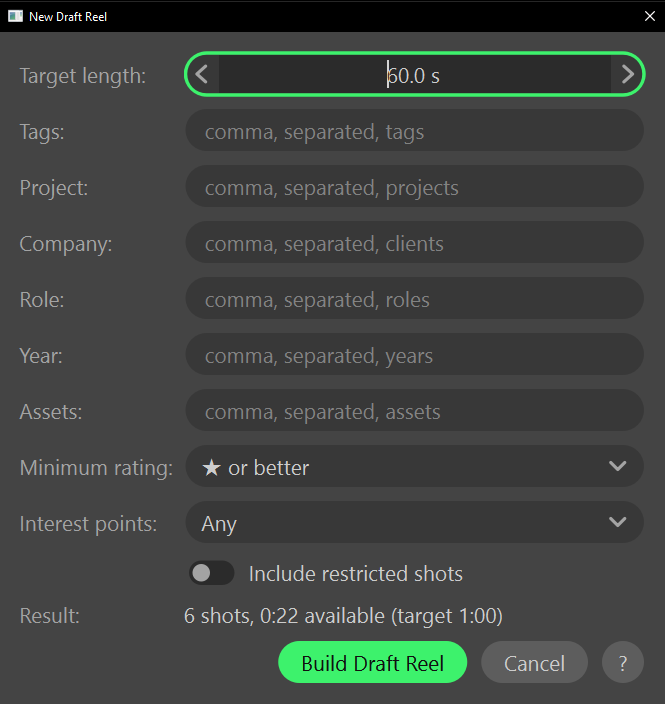
- Set Target length. It starts at 60 seconds.
- Narrow the pool with Tags, Project, Company, Role, Year or Assets. Each field suggests values your library already holds, and an empty field means no restriction.
- To accept any of several values in one field, separate them with commas. A shot has to match one of them.
- Set Minimum rating. ★ or better is the default; Any rating (includes unrated) lets unrated shots in.
- Leave Interest points at Any, or set it to Has interest points or No interest points to filter on them, or to Trim to interest range to shorten every shot that has them to the part you marked.
- Turn on Include restricted shots only if this reel is for someone allowed to see them.
- Read Result. It answers on every change with how many shots fit and how long they run against the target, so you can tune the filters before you build.
- Choose Build Draft Reel.
When nothing matches, Result reads "No shots match these filters." When shots match but none fits the target, it reads "None of the matching shots fit the target length." Either way Build Draft Reel stays unavailable.
What happens
A new tab named Draft Reel opens with the clips laid end to end. It is an ordinary reel: nothing about it is locked, so reorder, trim and delete freely.
- Order. Shots are taken best first: highest rated, then longest. ShotWork takes turns between projects, so one job cannot fill the reel.
- Fit. A shot too long for the time that is left is skipped, and the fill carries on, so a shorter shot after it can still make the cut.
- Trim to interest range. A shot with two or more interest points plays from the first to the last. A shot with one plays from it to the shot's end. A shot with none plays in full.
- Budget. Limit to is set to the target length, so the reel timeline marks it with a line. See Set a length budget.
- Frame rate. The reel is pinned to the rate most of its shots have. Pick Match footage under Reel Settings to have it follow the clips as you change them; see Frame size and rate.
- Restricted shots. With Include restricted shots on, the reel remembers that you allowed them, and Export Video does not ask about them again.
The other filters are not remembered. To try different ones, build another draft.
Related
- Add shots to fill an empty reel by hand.
- Describe a shot covers the ratings and fields a draft reel selects on.
- Interest points are what Trim to interest range keeps.
- Set a length budget for the line a draft reel starts with.