The free tier and your license
ShotWork is free to use, and stays free: marking shots, describing them, cutting reels and exporting them all work without a license. A license adds the four things listed below.
Two promises hold for every release:
- No update takes a feature away from a license that unlocked it.
- Nothing in the free tier ever moves behind a license later. New paid features may be added; existing ones never move.
What a license adds
| Free tier | With a license | |
|---|---|---|
| Overlay templates | Basic Lower Third on every shot of every reel, with its small "built with ShotWork" line | Your own templates, or none |
| Reel video | Up to 1280×720 | Any size |
| Timeline export (Final Cut Pro XML and OTIO) | Not included | Included |
| The AI assistant | Not included | Included |
Help › Licensing… lists the same four things while there is no license.
How a license works
Your license is a key, one long line of text sent to you when you buy one, and the email address it was issued to. ShotWork checks the two together on this computer against a key built into ShotWork: the key alone activates nothing, so a key passed around without its owner's email is no use to anyone. Nothing is sent anywhere, no account is needed, and there is no limit on how many computers you enter it on.
Each license covers one version line. Every 1.x release, including updates, accepts a 1.x license. If a 2.0 ever comes, it is a new purchase, and your 1.x copy keeps working exactly as it was.
Enter your license
- Choose Help › Licensing….
- Type the address the license was issued to into Email. Capitals, and spaces before or after it, do not matter.
- Paste the key into the box under it, or choose Browse… and open the
.licfile it came as. - Choose Activate.
What happens
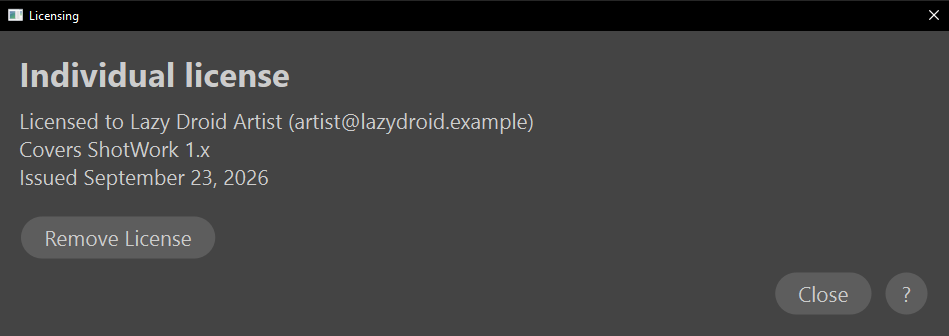
The window names the tier, who the license is for, the version line it covers, as "Covers ShotWork 1.x", and when it was issued. Help › About ShotWork… names the tier too, in its License section.
If the key and email do not check out together, the window says why under the box, and nothing changes. Check the email against the address the license was sent to, and paste the key again from the message it came in. If it still fails, write to [email protected].
Move, remove or update
- Move to another computer: enter the same key and email there. There is nothing to deactivate first.
- Remove a license: Remove License, in the same window, goes back to the free tier on this computer. Nothing you made is changed, and the same key and email work again later.
- Update ShotWork: every 1.x release accepts a 1.x license, so there is nothing to do.
- An institution license: the same license with your organization's name on it, bought once for a school or a studio site, for every computer there.
What the key holds
The key starts with SHOTWORK-LICENSE-1. and carries two more parts:
your details (name, the license type, an organization name, the version
line it covers, the date it was issued and an optional updates-through
date), then a signature over those details and your email address
together. The address itself is not in the key. ShotWork verifies the
signature with a public key compiled into ShotWork and trusts the
details only when the key and the email you typed check out as a pair.
It keeps them as license.txt in its app data folder: the key on the
first line, the email on the second. The updates-through date is for
the record: the window shows it, and nothing stops working after it.
Related
- First launch for the About panel and the Help menu.
- Where ShotWork keeps its files for
license.txt. - Licenses for the third-party software ShotWork is built on, which is a different thing.