Thumbnail cache
Shot thumbnails are not saved in your shot selects. ShotWork keeps them in a cache on each computer, so a shot selects file opened somewhere new starts without them. Thumbnails of deleted shots stay behind until you clear them.
Before you start
- A shot selects tab. Settings › Thumbnail Cache… is unavailable on a reel tab.
- ffmpeg, for rebuilding. ShotWork offers to fetch it if it does not have it yet.
Rebuild missing thumbnails
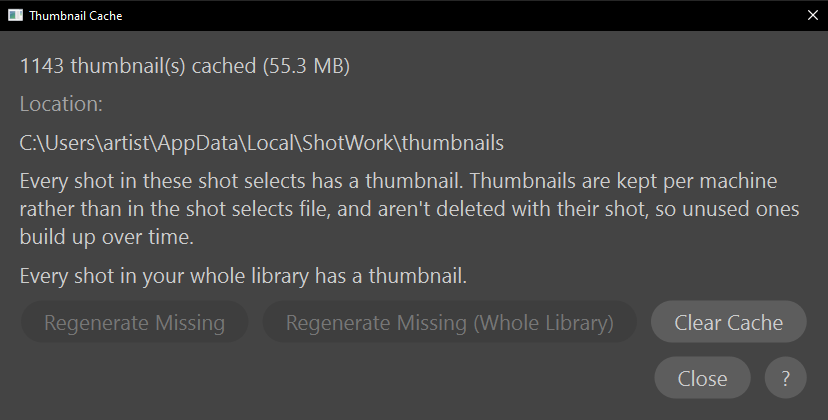
- Choose Settings › Thumbnail Cache…. It shows how many thumbnails are cached and how much space they take, the folder they are in under Location, and how many shots have none.
- Choose Regenerate Missing for the shots in this shot selects file, or Regenerate Missing (Whole Library) for every shot selects file in your library, including ones you have not opened on this computer.
- Choose Close when it is done.
Each button is available only while some shot is missing a thumbnail. Rebuilding shows a progress window you can cancel. If nothing could be rebuilt, the shots' videos may be missing or unreadable.
Clear the cache
- Choose Settings › Thumbnail Cache….
- Choose Clear Cache, and Yes to confirm.
Every cached thumbnail on this computer is deleted, and this shot selects file's are rebuilt at once so its list is not left blank. Other shot selects files' thumbnails are rebuilt the next time you open them.
What happens
- Opening a shot selects file rebuilds its missing thumbnails by itself, without asking; a progress window appears only if it takes more than half a second. You rarely need Regenerate Missing for the shot selects you have open.
- A thumbnail shows the middle of the shot, or the middle of its first two interest points when it has them. It may land a frame or two away, which is fine for a picture and never used for export.
- Shots you mark by hand take their thumbnail from the viewer, and detected or imported shots get theirs from ffmpeg.
- Deleting a shot keeps its thumbnail, so undoing the delete brings the picture back too. Clearing the cache now and then drops the leftovers.
- Rebuilding never marks a shot selects file unsaved, because thumbnails are not part of it.
- A reel tab keeps showing the old thumbnail for a shot rebuilt while the tab is open; reopen the reel to see the new one.
Where thumbnails are kept
Each thumbnail is a JPEG, 192 pixels wide, named by its shot's id, in the
thumbnails folder of ShotWork's app data.
Batches from shot detection and clip import are made by several ffmpeg
processes at once.
Related
- Where ShotWork keeps its files.
- Open a video for opening shot selects on another computer.
- The Library window for the shot selects Regenerate Missing (Whole Library) covers.