Export shots
Every marked shot becomes its own clip in one action, so marking a whole
film never waits on rendering any of it. When you finish you have a folder
of clips and a metadata folder beside them.
Before you start
- Shot selects with at least one shot. With none, File › Export… says "Mark at least one shot first."
- ffmpeg, which ShotWork offers to fetch the first time you export.
- Every video where ShotWork expects it. A shot whose video has moved fails in the results list with ffmpeg's error, so relink first. See If a video has moved.
Steps
- Choose File › Export… (Ctrl+E).
- In Batch Export, pick which shots: All shots (80), Selected shots (3) when shots are selected, or Filtered / visible shots (12) when the filter is hiding some. Each carries its count.
- Pick a Preset: H.264 (review/upload), ProRes 422 HQ (editorial) or DNxHR HQ (editorial). A preset marked (encoder not found) is one your ffmpeg build cannot make.
- Set Handles (frames) to add up to 300 frames before each in point and after each out point. Handles stop at the video's first and last frame.
- Edit the Filename template if the default does not suit. See Name the clips.
- Set the Output folder, or choose Browse….
- Choose Export.
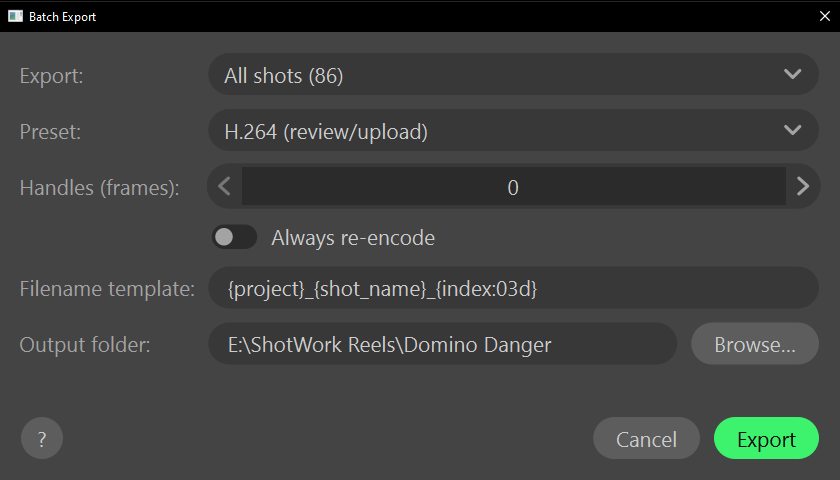
Output folder starts at the folder you last exported to in this session, or else the loaded video's folder. Browse… opens on the folder you last chose there, which ShotWork remembers between sessions. With the field empty, Export asks for a folder first.
If any of the files already exist, Overwrite existing files? lists up to ten of them and asks first. A re-export with the same settings replaces the same files rather than piling up copies.
Name the clips
The default template is {project}_{shot_name}_{index:03d}, and an empty
field uses it. Right-click the field and open Insert Key to put a key
in where the cursor is.
| Key | Becomes |
|---|---|
{project} |
The shot's Project field, or else the shot selects file's name |
{shot_name} |
The shot's name |
{index} |
Its position in this export, from 1 |
{index:03d} |
The same, three digits wide: 001, 002 |
{tags} |
Its tags, joined with underscores |
{assets} |
Its assets, joined with underscores |
{company} |
The Company field |
{year} |
The Year field |
{role} |
The Role field |
{rating} |
Its stars as a number, 0 to 5 |
Insert Key also offers every field in the shot selects file's preset, by its id, after these; see Field presets. A field a shot leaves empty becomes nothing in its name.
Export checks the template before it writes anything. A key it does not
know is refused by name, and a stray brace is refused with a message that
ends "Check the { } braces." Characters a file name cannot hold become
underscores, and a name that comes out empty becomes shot.
What happens
Each shot renders in turn, and the list under the progress bar fills in as they finish: a check and the shot's name for each clip written, or a cross, the name and ffmpeg's error for one that failed. The summary counts them, as "79 succeeded, 1 failed". Cancel stops after the clip in progress and becomes Close, and you can run Export again from the same dialog.
- Every clip is re-encoded to exactly the marked frames, plus any handles.
- One kind of clip is copied instead. A clip that is already exactly the preset's codec and container, and covers its whole video with no handles, is copied, and its line reads (copied, already in this format). Turn on Always re-encode to encode those too, for a uniform bitrate across the set.
- Restricted shots export like any other. Only reel exports ask about them.
- Beside the clips, a
metadatafolder holds one JSON file per clip: the whole shot record with its interest points, the video it came from, the frames exported including handles, the preset, and when it was exported. File › Import Clips… reads these back, so a folder of clips comes back into a shot selects file with nothing lost. See Import clips. - Each clip identifies itself too. Its file's comment holds the shot's id, name, tags, project and exported frames, so a clip separated from its folder still says what it is.
- A clip that failed gets no metadata file.
How a shot is cut
ShotWork seeks quickly to five seconds before the in point, then
precisely to the in point, and writes exactly the shot's number of
frames, so no cut snaps to a keyframe. H.264 is libx264 at the slow
preset and CRF 16, 4:2:0, in an .mp4; ProRes 422 HQ is 10-bit 4:2:2 in
a .mov; DNxHR HQ is 4:2:2 in a .mov. Every preset's audio is AAC at
192 kbps. A clip is copied rather than encoded only when Always
re-encode is off, handles are 0, the shot covers its whole video, and
the video's extension and codec both match the preset's.
Related
- Import clips brings an exported folder back as shot selects.
- Describe a shot for the fields the keys read.
- Filter the list to export exactly the shots the filter shows.